Stacked diffs
that stay in sync.
Turn a big branch into a reviewable stack with
sdf split, or
build one from scratch and keep it synced with
sdf sync —
with optional Claude-powered conflict resolution.
New to the workflow? Read what stacked diffs are and when to use them.
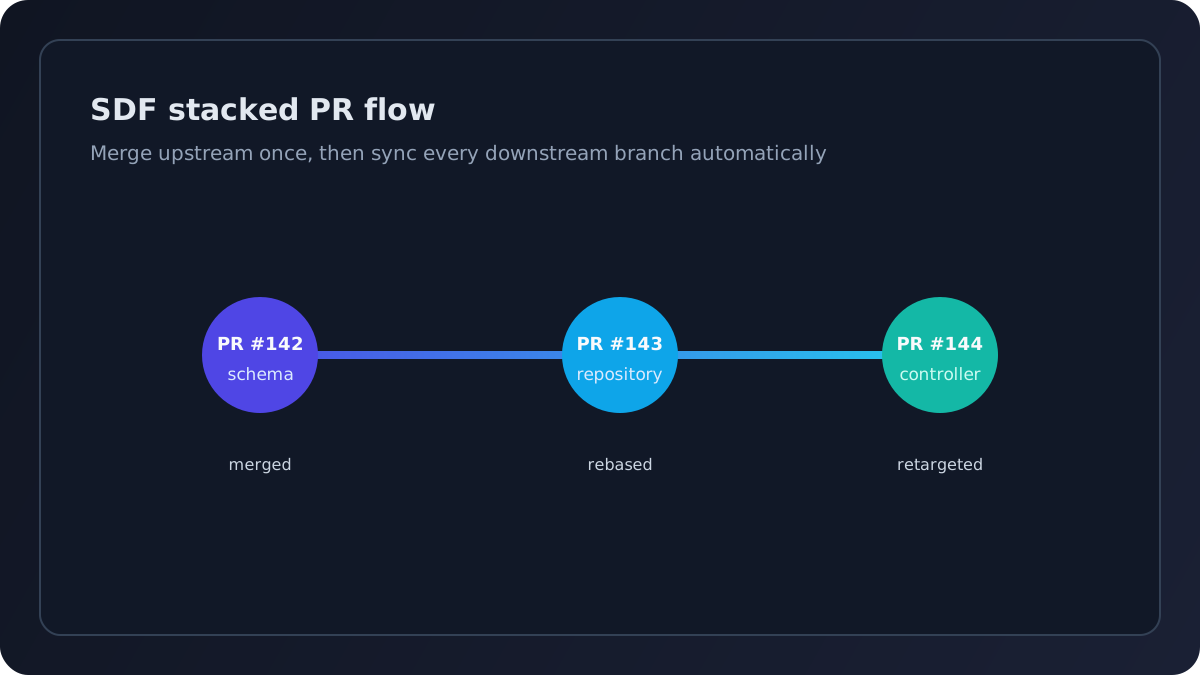
sdf sync to propagate updates.
brew install pavelpascari/tap/sdf Also available via go install and binary download — Linux, macOS, Windows
The pain of stacked PRs — solved
× Manual cascade rebasing
✓ One command rebases every downstream branch after an upstream PR merges.
× PR base drift on GitHub
✓ PR bases are updated during sync to match the real topology.
× Losing track of dependencies
✓ Stack topology tracked in .sdf/ with automatic navigation links in every PR description.
Everything stacked diffs need
A thin layer built on git and gh. No servers, no extra auth — just the tools you already use, working together.
AI branch splitting
sdf split takes a large branch and decomposes it into a stack of focused, reviewable PRs.
Claude analyzes your diff, identifies semantic themes, and creates each layer in dependency order — with hunk-level precision when the same file spans multiple concerns.
The original branch is never touched.
Cascade rebase
sdf sync detects merged PRs and rebases every downstream branch in order, then force-pushes with --force-with-lease.
AI-powered PR content
Claude generates PR titles and descriptions from your diffs. During sync, it can resolve rebase conflicts semantically.
Safe one-at-a-time merging
sdf merge squash-merges the head PR, retargets downstream PRs, then cascade-rebases the rest of the stack.
Multiple stacks
Manage any number of independent stacks per repo. Each with its own base branch, nodes, and PR metadata.
GitHub-native
Works entirely through gh CLI and git. No servers, no external services, no auth tokens beyond what you already have.
Stack reconciliation
sdf fetch discovers existing PR stacks from GitHub and reconciles them with local state. Join a stack on any machine.
Two ways to stack
Build a stack branch by branch, or split an existing branch into one automatically. Either way, SDF handles the rebasing when anything upstream changes.
Create a stack
Create a named stack and its first branch in one command.
SDF tracks the topology in .sdf/
locally. Add more branches with sdf branch,
then open PRs with sdf pr.
$ sdf new --branch db-schema users-feature
Initialized stack "users-feature" (base: main)
Created branch "users-feature/db-schema" (based on main)

Next steps:
  sdf pr               Create a pull request
  sdf branch <name>    Add another branch to the stack
sdf status View stack topologyLayer your branches
Add more branches to the stack. Each branch builds on the previous one.
sdf pr creates
the GitHub PR with the correct base branch and adds stack navigation links
to every PR description — reviewers see the full stack at a glance.
$ sdf branch repository && sdf pr
Created branch "users-feature/repository" in stack "users-feature" (based on users-feature/db-schema)
https://github.com/.../pull/143

$ sdf status
  users-feature  (base: main)

   ● users-feature/db-schema    PR #142  open     in sync
 → ● users-feature/repository   PR #143  open     in sync
● users-feature/controller PR #144 open in syncSync when PRs merge
When an upstream PR merges, run sdf sync.
SDF detects the merged PR, rebases every downstream branch in order,
updates GitHub PR bases, and offers Claude-powered resolution if conflicts arise.
$ sdf sync
Syncing stack users-feature...
Fetching from origin...
  ✓ PR #142 (users-feature/db-schema) merged
  rebasing users-feature/repository onto main...
  ⚡ conflict in users-feature/repository — 1 file(s):
    internal/model/user.go
  invoking Claude for conflict resolution...
  ✓ conflict resolved by Claude
  ✓ users-feature/repository rebased and pushed
  ✓ users-feature/controller rebased and pushed
  ✓ 1 PR base(s) updated on GitHub

Sync complete. Stack updated.
Already have a big branch?
Split it into a stack
sdf split uses Claude
to decompose an existing branch into focused, reviewable layers — without touching the original.
Point sdf split at any branch.
Claude analyzes the diff, identifies semantic themes, and proposes a split plan.
Review the plan, refine if needed, then execute — SDF creates the branches,
verifies the split is lossless, pushes, and opens PRs.
$ sdf split --from feature/big-change --stack my-feature
Analyzing feature/big-change...

Split plan for my-feature (base: main)
──────────────────────────────────────────
  Layer 1: schema (6 files, +142 -3)
  Layer 2: api (8 files, +310 -12)
  Layer 3: ui (9 files, +395 -28)

Executing split...
  ✓ Layer 1: my-feature/1-schema -- 6 files applied
  ✓ Layer 2: my-feature/2-api -- 8 files applied
  ✓ Layer 3: my-feature/3-ui -- 9 files applied
  ✓ Tree identity verified -- split is lossless

✓ Split complete -- 3 branches created in stack "my-feature"
PRs that document themselves
Stack navigation links are injected into every PR description automatically.
Add --with-content and Claude
generates titles and descriptions from your diffs.
Stack navigation in every PR
sdf pr and
sdf sync inject
a navigation section into every PR description. Reviewers see the full stack at a glance
and can jump between related PRs. Links update automatically as PRs merge.
Add the UserRepository with CRUD operations and pgx integration.
Stack: users-feature
- add users table migration #142
- add user repository #143 ◀ this PR
- add user controller endpoints #144
AI-generated titles and descriptions
sdf sync --with-content uses Claude
to generate PR titles and descriptions from your diffs. Titles are kept concise, descriptions explain the what and why.
Only PRs with meaningful changes get updated — unchanged content is left alone.
$ sdf sync --with-content
Syncing stack users-feature...
  ...
  ✓ PR #143 title updated
  ✓ PR #143 description updated
  ✓ PR #144 title unchanged
  ✓ PR #144 description unchanged

Updated 1 PR(s).Up and running in seconds
Requires git. GitHub CLI (gh) for PR operations.
Claude CLI for AI features (optional).
Homebrew
macOS and Linux
brew install pavelpascari/tap/sdf Go install
Go 1.24+ required
go install github.com/pavelpascari/sdf@latest Binary download
All platforms
github.com/pavelpascari/sdf/releases After installing
Set up your environment
Shell completions
Tab-complete commands, flags, branch names, and stack names.
sdf completion install
auto-detects your shell and writes the completion script to the right location.
$ sdf completion install
✓ Zsh completions installed to ~/.zsh/completions/_sdf
✓ Updated ~/.zshrc with fpath entry
  Restart your shell to activate.
Claude Code integration
One command teaches Claude how to use SDF — it creates a skill file so Claude remembers commands, workflows, and conventions across sessions.
$ sdf ai intro
→ Setting up SDF skill for Claude Code...

✓ Skill created. Claude Code will load SDF knowledge in future sessions.Stop rebasing by hand.
SDF is free and open source.
Run sdf doctor to
verify your setup and start stacking.